


Atlassian Data Center end of life: Stiltsoft supports Cloud since day one

September 24, 2025
#News
21 min

​As you might already know, Atlassian is ascending to the Cloud and leaving Data Center behind in 3 years.

This is massive news for the entire Ecosystem, as well as us at Stiltsoft.

What’s going on with Atlassian Data Center end of life?

Since our history began in 2010, we’ve developed 18 on-premise Marketplace apps for Jira, Confluence, and Bitbucket. Some of them are already history, while the active ones still account for about 1/3 of our customer base. Many of our customers chose Data Center hosting because they valued performance at scale, advanced security features, and granular control over their instances.

After the Server sunset in 2024, most Ecosystem players anticipated this move by Atlassian as a logical next step, even though it was still hard to believe. We’ve seen Atlassian gearing up towards a Cloud-only future by increasing the maximum user limits for Cloud sites and expanding data residency to drive Cloud adoption. They’ve introduced FedRAMP-compliant Government Cloud and Atlassian Isolated Cloud offerings to meet the enterprise needs. They’re even building a multi-cloud architecture through a partnership with Google Cloud.

We could only guess when exactly this announcement would come. Anyway, the reality looks like this:

  • From March 30, 2028, existing customers will no longer be able to renew their licenses.
  • On March 28, 2029, all Data Center licenses will expire and become read-only.

Good news: Bitbucket DC isn’t going anywhere! You’ll get special dual licenses for both hosting platforms, so you don’t have to move critical code if you don’t want to.

How does Stiltsoft support these changes?

Stiltsoft is an Atlassian Platinum Marketplace Partner and a top-selling app vendor in the Ecosystem. We help over 15,000 companies maximize value from their ever-increasing Atlassian investment with our Marketplace apps designed to elevate their System of Work.

Within 15 years of our existence, we’ve gone all the way from just two founders to an international company with 50+ employees all over Europe. Obviously, we’re following Atlassian on its Cloud journey since day one to maintain our leading position in the Atlassian Marketplace.

Cloud apps: moving to Forge

We’ve already made critical steps to ensure the security of our customers' Cloud environments. We went through SOC2 Type II certification, enrolled in Bug Bounty and Cloud Fortified programs. Now, one of our primary strategic goals is to migrate our top Cloud apps to Forge and run them entirely on Atlassian infrastructure.

We’re working on this together with Atlassian and some of our largest customers, ensuring we meet the technical requirements and address all the functional blockers along the way.

Also, we've set up a dedicated Forge R&D team to further explore the potential of the new platform and get our feedback through to its developers. They've already released their first apps that run on Atlassian: LaTeX Math for Confluence and Checklist for Jira Cloud.

Our Cloud-only apps are in no way affected by Atlassian Data Center end of life

​Data Center apps: migrate or… migrate

Just like Atlassian, we’ll maintain and support all our Data Center apps until the last day, or even longer for customers with unique circumstances. Most of them have a corresponding Cloud version, so we’ll be happy to help you set them up and running in the new environment, or move existing data as needed.

That said, we have four DC-only apps that are already covered in Confluence Cloud as native features or through connectors:

Which means you’ll have these features for free when you switch hosting!

Here are some alternatives recommended by Atlassian for the most popular DC-only Jira and Confluence apps.

We’ll support our Data Center-only apps until the last day. Some of them are already covered in Confluence Cloud as native features or through connectors, and Bitbucket DC isn’t affected by the end of life

​What kind of Cloud migration support can Atlassian customers receive?

Thousands of Atlassian customers have successfully migrated to Cloud over the last three years. Now we have three more to prepare and take this step with confidence.

Here’s how you can make the shift a little bit easier.

se these resources to migrate: Stiltsoft Support, documentation, and Partners; Atlassian migration hub, FastShift program, and Community forum

​Atlassian resources

  • Atlassian provides several discounts and incentives for customers moving from Data Center to Cloud, including extended trials and dual licensing. This makes sure you don’t pay double during the migration period.
  • For customers with fewer than 1,000 users, there’s a set of self-service tools that includes the Cloud Migration Assistant. These tools help plan the project and automate moving settings, workflows, and custom fields.
  • Companies with 1,000 to 5,000 Atlassian users can benefit from their brand new FastShift Program. It promises an acceleration in migration timelines from 12-16 to just 2-6 months.
  • From 5,000 users onwards, their Enterprise Advisory Services will support the most complex use cases.

Seek help from a Solution Partner

Atlassian recommends performing the migration with a Cloud-specialized Solution Partner for companies with over 1,000 users. They have years of hands-on experience in going through the entire process, from assessing your DC instance to retraining users in the Cloud environment.

If you haven’t worked with a Solution Partner before, reach out to us for a recommendation. We work with over 50 top Atlassian Ecosystem players within the Stiltsoft Partner Program, so we’ll be happy to introduce you to a matching partner according to your needs and geographical location.

Stiltsoft documentation & support

Based on our experience, we’ve developed dedicated resources to help Stiltsoft customers move our products to Cloud. Depending on the app, they include full migration guides, feature parity comparisons, or pre-migration assessment checklists.

Here’s a complete list of apps available on both hosting platforms.

Our flagship apps all have Cloud versions. For them, we provide migration guides, feature comparisons, and assessment checklists

​Many customer reviews highlight our top-notch support teams, who assist in solving even the most complex challenges. You can always reach out to them directly or ask a question on the Atlassian Community.

What’s next after Atlassian Data Center end of life?

After the Data Center end of life, we will fully focus on developing our Cloud apps portfolio, adding new products, and working with our partners to create comprehensive solutions. Until then, supporting migration and additional compliance, such as FedRAMP or DORA, will be among our top priorities.

Stiltsoft remains committed to elevating the Atlassian software experience and growing together with our customers. Our mission stays the same: enable faster decisions, reliable delivery, and breaking silos with knowledge for every team.

We’re here for you, open to any questions or inquiries related to our DC apps or Cloud migration assistance.

Let’s take this step together!

Stiltsoft co-founders, Maxim Kuzmich and Alex Kuznetsov

Related posts

    What’s New in Team Calendars for Confluence

    June 1, 2018
    #News#Confluence
    4 min

    Atlassian Confluence is a team collaboration platform that encourages knowledge-sharing and helps you place all the required information in order in one place accessible to all team members. It is a nice solution for teams of all sizes and specializations that brings a new level of transparency to your team work.

    But what really matters when we speak about the team work is to keep everyone on the same page. Especially when your colleagues have different schedule and multiple projects to work on. Atlassian offers the Team Calendars for Confluence app to improve team planning with the help of a bird’s-eye view of your team’s schedule.

    So let’s check the most interesting features and new capabilities of this useful tool.

    Team Calendars for Confluence

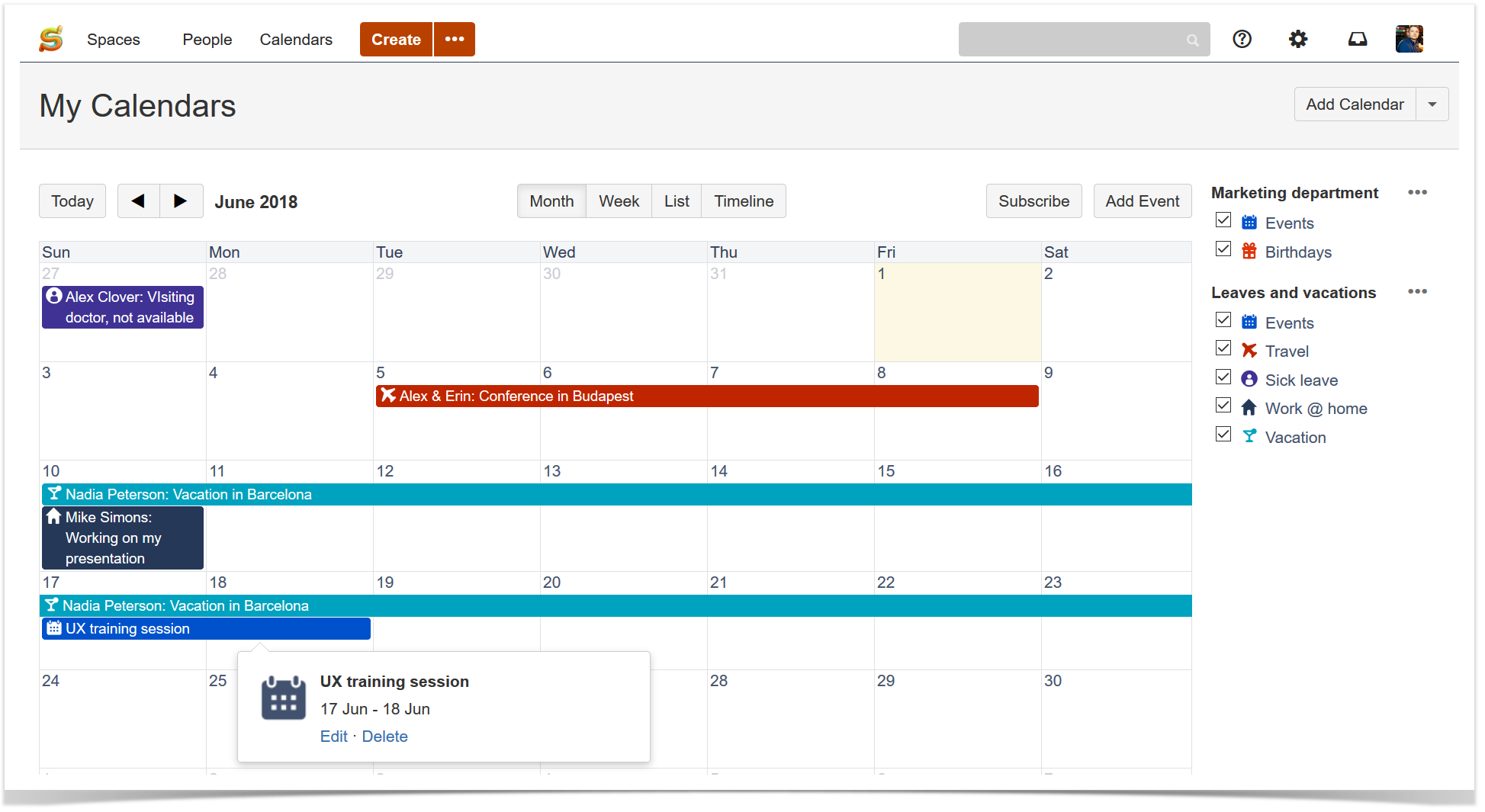
    You can create multiple calendars and populate them with different event types helping your team know who’s doing what and when.

    team calendar 1

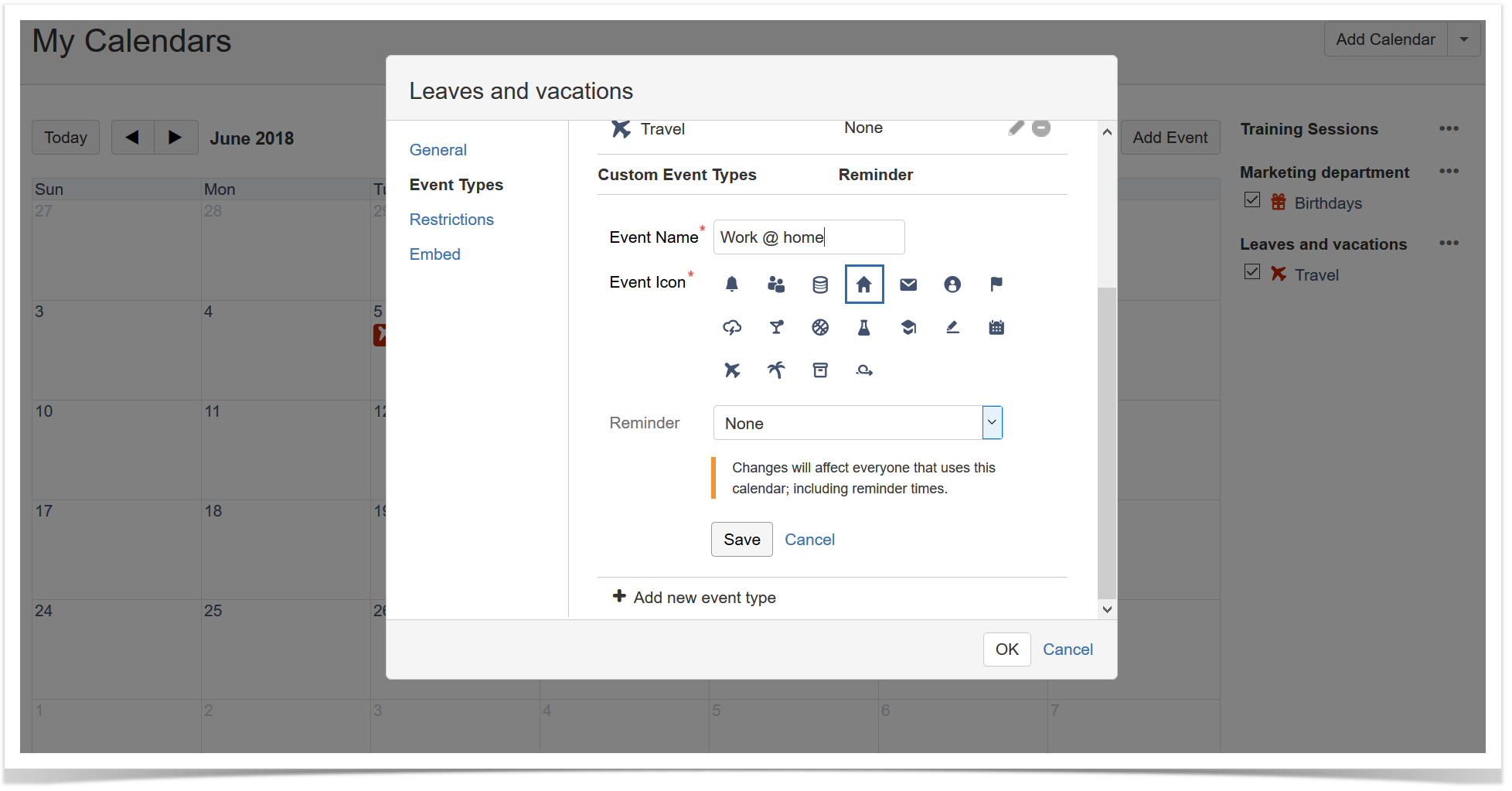
    This app allows you to add custom event types to your calendar or create your own events.

    team calendar 2

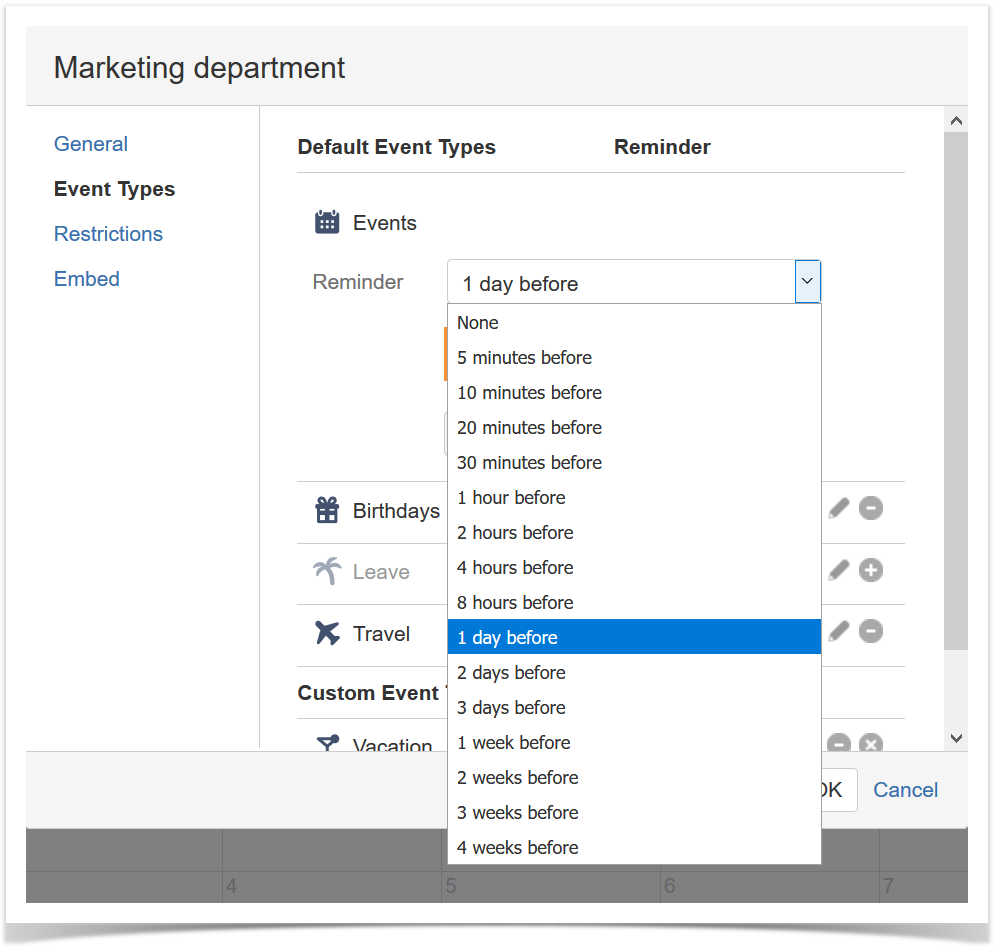
    You can also set a reminder not to forget about some important events. Everyone who uses this calendar will receive it.

    team calendar 3

    A fresh look of Team Calendars

    The latest release of Team Calendars provides you with a new design of this app with updated colors, typography, and icons.

    team calendar 4

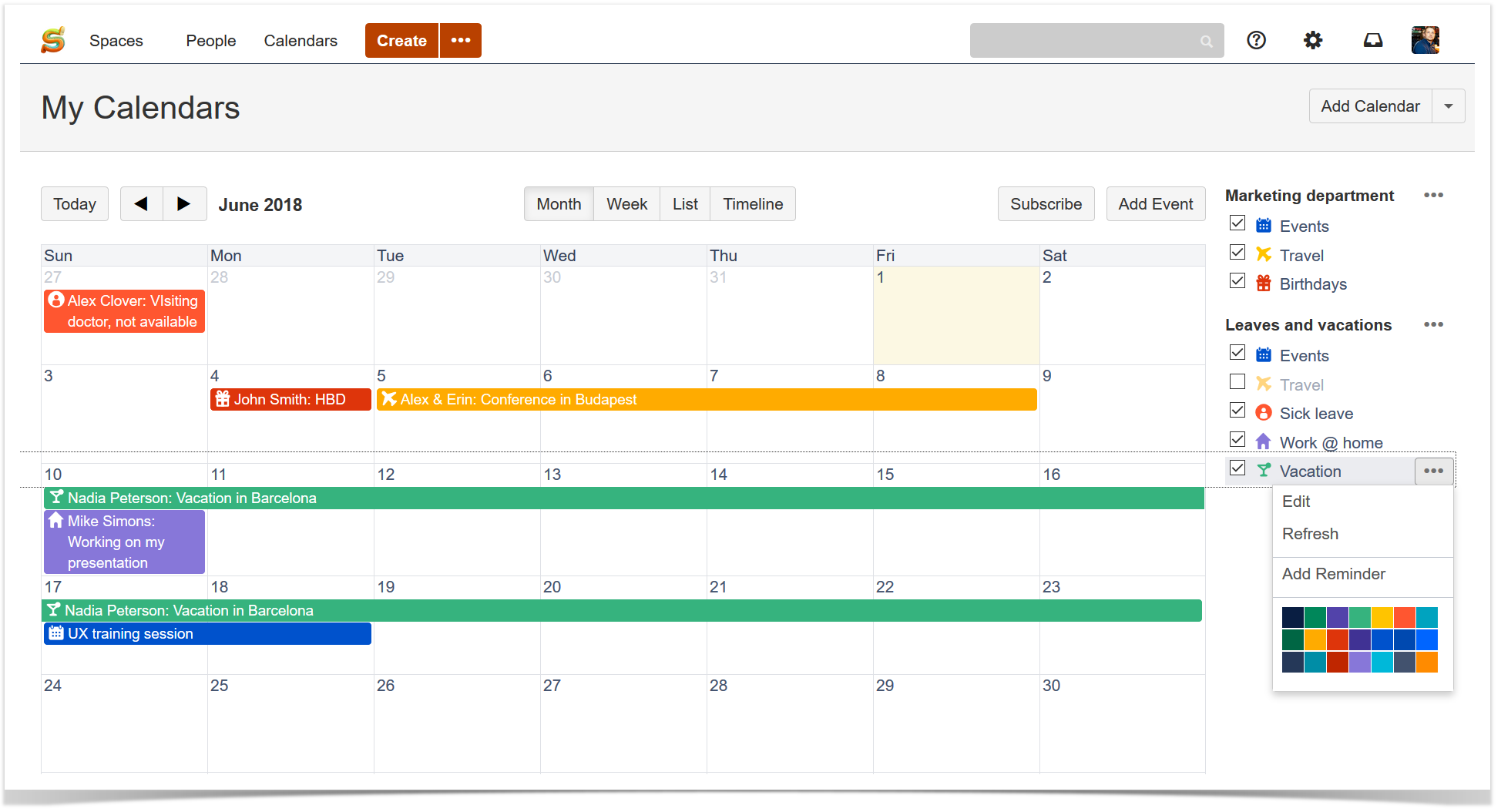
    So now you can even change the colors of the custom event types.

    The Team Calendars app now supports CalDAV

    Team Calendars easily syncs with your favorite calendar client, such as Outlook, Google Calendar (Android) or Apple Calendar. In the latest release Atlassian added the feature a lot of users have been waiting for – now this app also supports CalDAV.

    This means that after subscription to a calendar in any app that supports CalDAV, you will be able to view and update events from it and make it easier for your team to find the information needed to keep work moving forward.

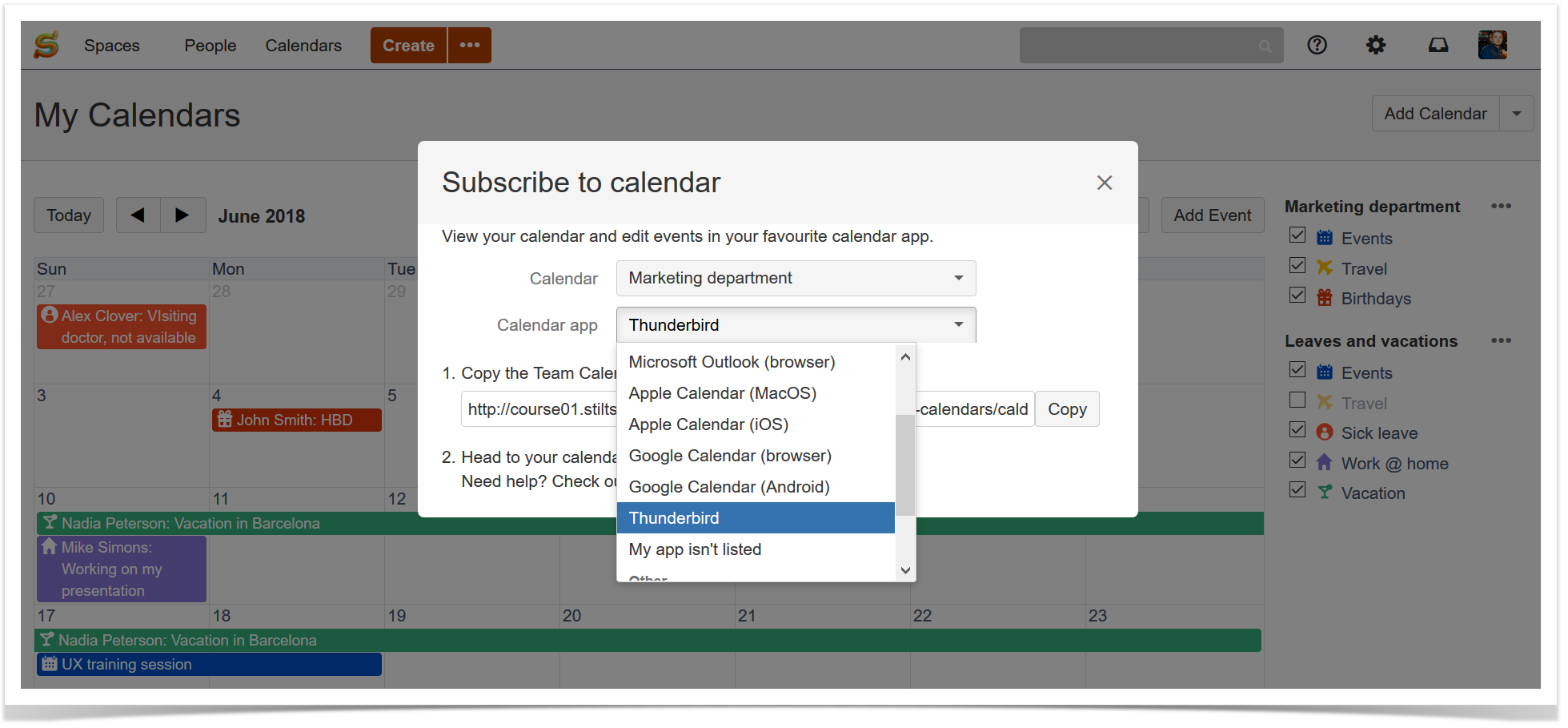
    All you need to do is to click the Subscribe button and choose the required app.

    team calendar 5

    Even if your app is not listed, there’s a good chance it supports either iCal or CalDav. You just need to check your calendar app’s documentation to find out what it supports, then choose either iCal or CalDav from the Calendar app field.

    Try Team Calendars for Confluence

    This useful tool saves your time and effort when you need to understand how your schedule will affect upcoming work.

    The price for Team Calendars for Confluence Cloud starts at $50/mo for 20 users and ends at $1,350/mo for 2,000 users. For Confluence Server the price starts from $550 for 25 users and ends at $7,700 for 10,000+ users.

    Start a 30 day trial of Team Calendars via the Atlassian Marketplace!

    Related posts

      Atlassian Team Playbook: Monitor Your Team’s Health

      February 23, 2018
      #How To
      8 min

      Atlassian development and collaboration tools definitely help us monitor the health of our projects. But have you ever thought about checking the health of your team?

      If you track your team health, you can understand what factors affect the mood and engagement of your team members. This way you can ensure that your team has a healthy culture and can function as effectively as possible.

      Atlassian shared their best practices guide called Atlassian Team Playbook. They developed the Team Playbook to provide teams with a set of team building activities that can be vital in getting and keeping great business results.

      In this blog post, we will tell you more about the step-by-step instructions suggested by Atlassian. You can use this information to get your team on track towards achieving your goals.

      Health Monitors

      The Atlassian team recommends to start with Health Monitors. This way you can define where your team is at the moment, why and how you got there, and what next steps to take.

      The first thing you need to do is to identify your team type and choose the Health Monitor workshop accordingly:

      These workshops contain direct guidelines that will give you a better understanding of your strengths and weaknesses as a team, and will provide you with the insight into how to manage them up.

      For example, if you choose the Leadership Team Health Monitor, you will need to gather your team together for a one-hour meeting. Share the Health Monitor grid with the eight attributes of healthy leadership teams. Divide the participants into small groups and ask them to rate all the attributes. When you receive the results, you can go through each attribute one by one, and ask the groups to explain their rating.

      This approach will help you to assess the team’s health and focus on the things that really matter.

      During the workshops you will need Atlassian blueprints that will help you to document your team’s health during the Health Monitor workshop. You can get Atlassian Team Playbook blueprints for Confluence Server or download the apps for Confluence Cloud depending on your team type:

      The Health Monitor workshop allows you to take a closer look at the performance of your team.

      Plays

      Now when you know the major bottlenecks that are slowing down your productivity, you can choose the appropriate play that will show your team how to work better together.

      For example, sometimes it is difficult to understand the real needs of your customers. In this case the Customer Interview play can help you. And if you want to get peer feedback from teammates and stakeholders, you may try the Sparring play that will help your team take your project to a new level.

      For all the plays and the Team Playbook activities you will definitely need a rubber chicken! Do you want to know why? Check the Atlassian blog.

      These techniques allow you to determine the root cause of your problem and find the best solution to solve it. The plays suggested by Atlassian will help your team unleash its potential.

      Game Plans

      Not sure which play to run? Use the game plans. They will provide you with the go-to recommendations and examples for specific use cases.

      Choose the topic that fits your pain points:

      To achieve better results, combine all the techniques described in this blog post. These step-by-step instructions can help you address issues, make changes, and improve engagement of your team.

      What about your team?

      If your employees are not enthusiastic about the work or being on the team, no process or methodology will help. So encourage your team members and keep them motivated. Do your best to identify problems early to create a healthy work environment in your organization.

      Please, tell us about your way to check and evaluate your team engagement. Let us know if you find this blog post useful. You may also ask us any questions you have about Atlassian Team Playbook. Feel free to comment below.

      Related posts