






Effective strategies for OKR tracking and updates

OKRs don’t usually fail because teams pick the wrong objectives. They fail because progress isn’t monitored consistently, updates become subjective, and leaders don’t get a clear signal early enough to course-correct. How does structured OKR tracking help teams be on the same page? Let’s explore.
A durable Objectives & Key Results monitoring system is built on three things:
- A regular OKR tracking cadence people actually follow
- Standardized progress benchmarks (so “70% complete” means the same across teams)
- Clear visibility via lightweight dashboards and data visuals without turning OKR updates into admin work
Get a free, ready-to-use Confluence template for OKR monitoring. Available at the end of this article.
Establish a weekly OKR update cadence (and keep it simple)
Weekly check-ins are frequent enough to catch drift but not so frequent they become noise. As an example, for our team, a practical cadence looks like this:
- Monday (10–15 minutes): KR owners update progress and evidence
- Mid-week (async): dependency check + unblock requests
- Friday (10-15 minutes): confidence rating + next-week focus
The win here is consistency. Every team in the entire organization uses the same rhythm; consequently, leadership can spot patterns quickly (e.g., repeated dependency delays, recurring resourcing issues, or metrics that stop moving).
Use percentage benchmarks that are consistent and defensible
“Percent complete” becomes misleading when it’s based on effort, not outcomes. Two approaches keep it credible:
1. Milestone-based progress (best for projects and launches). Use when work is non-linear, for example, migrations, rollouts, initiative delivery.
- Define 4–8 milestones
- Progress = milestones completed / total milestones
2. Metric-based progress (best for numeric targets). Use when the key results are truly measurable, for example, adoption, revenue, latency, churn.
- Progress = (current – baseline) / (target – baseline)
To prevent fuzzy reporting, add a written rule: percent must reflect completed milestones or measured outcomes, not time spent.
Build an OKR dashboard that answers three questions fast
Your OKR page should make it easy to answer:
- Are we on track with our strategic goals and specific key results?
- What changed since last week?
- What are we doing next?
A simple structure that scales:
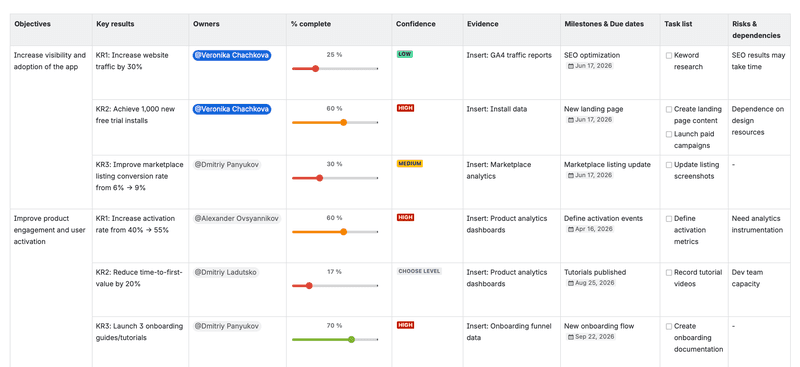
- Top section: OKR summary (objective, KRs, owners)
- Middle: progress table (percent + confidence + evidence)
- Bottom: risks, dependencies, and action items
OKR tracking in Confluence: How Handy Macros helps
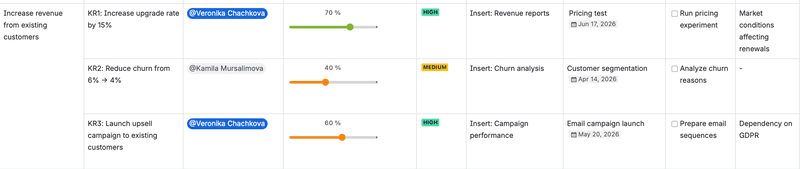
Have you found the best OKR software for your organization yet? For us it’s definitely Confluence. If your teams run OKRs in Confluence, Handy Macros can assist you with building dynamic OKR dashboards with structured elements like Handy Status, Handy Slider, and Handy Date. This helps updates stay consistent, progress is easy to scan, and quarterly rollovers don’t require rebuilding the whole page.
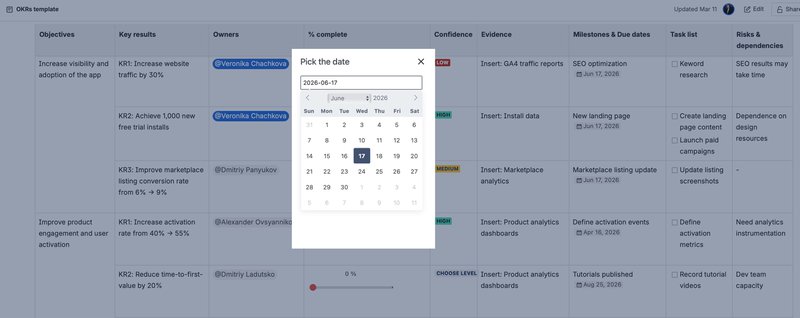
1) Use Handy Date to keep OKR timelines impossible to miss
OKR work often slips, as a result, key dates get buried in text. With Handy Date, you can place important deadlines for personal OKRs and review moments directly where people make decisions, making the timeline explicit and visible at a glance.
Use it for:
- KR due dates
- Milestone deadlines
- Weekly check-in dates
- Date tracking
This turns your OKR page into a living timeline instead of a static document.
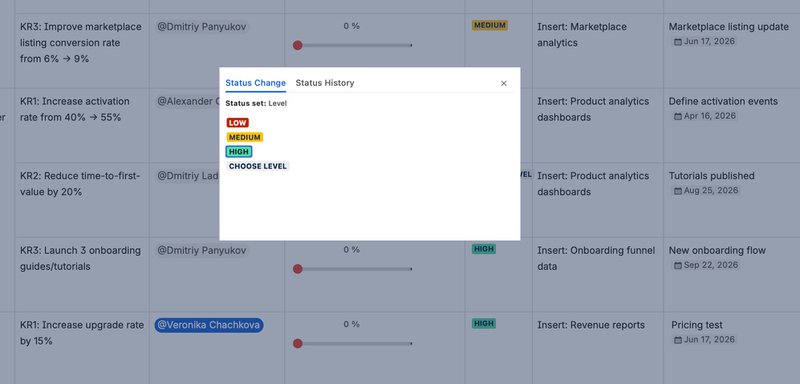
2) Use Handy Status to standardize updates across teams
When every team writes status differently, dashboards become hard to compare. Handy Status gives you a consistent language for OKR health (for example: On track, At risk, Blocked, Done), so leadership and cross-functional partners can scan outcomes without decoding paragraphs.
Use it to:
- Mark each Objective and KR health
- Flag blockers and dependencies early
- Create an easy “portfolio view” across multiple OKR pages
3) Use Handy Slider to show progress without overexplaining
Written updates often turn into long narratives. With Handy Slider, you can capture KR progress in a visual, structured way (for example, 0–100% or a custom scale), which makes trends obvious during weekly reviews.
Use it for:
- KR real-time progress tracking
- Confidence level (low to high)
- Effort / complexity signals
- “How close are we to target?” check-ins
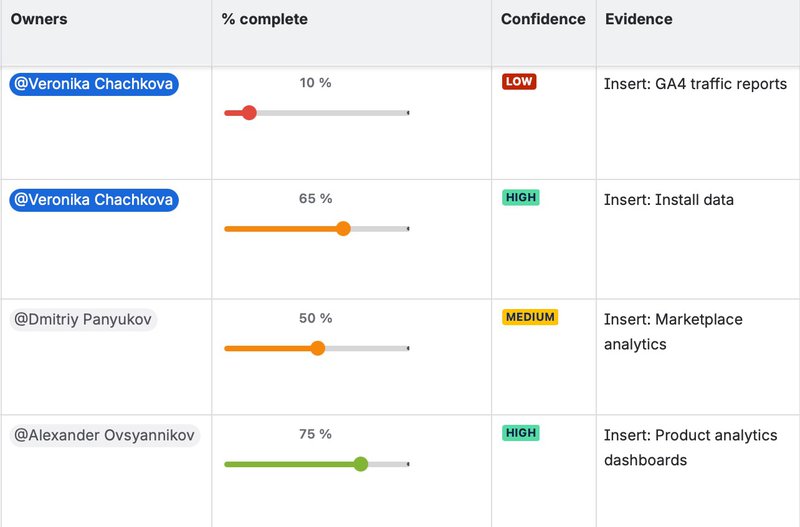
Together, Handy Date + Handy Status + Handy Slider help you shift OKR updates from ad-hoc reporting to a repeatable, easy-to-maintain cadence without rewriting dashboards every quarter.
OKRs tool in Jira: Use Smart Attachments to organize OKR evidence and deliverables
While many teams track OKRs in Confluence, the actual execution usually happens in Jira. Files like reports, research, campaign assets, or rollout documentation often get scattered across issues and tools, making it harder to connect progress updates with real outcomes.
Smart Attachments for Jira helps teams keep OKR-related files structured directly inside Jira issues. Instead of searching through attachments, teams can organize files into folders or categories (for example: research, design assets, launch materials, or reports) and maintain a clear version history as documents evolve.
This makes it easier to link execution in Jira with OKR reporting in Confluence. When stakeholders review progress, they can quickly access the supporting deliverables behind each milestone or Key Result.
Combined with Handy Macros in Confluence, this creates a simple OKR workflow: dashboards and updates live in Confluence, while Jira and Smart Attachments keep the underlying work and artifacts organized.
Proven OKR tracking tactics that reduce drift
Standardize “confidence” and require a reason
Add a simple confidence signal:
- Green: on track
- Yellow: risk is real, but recoverable
- Red: off track without intervention
The key isn’t the color, it’s the discipline of adding one sentence to explain the rating. Over time, this becomes your early warning system.
Track evidence, not opinions
Each KR should have one “source-of-truth” metric (or milestone proof). Weekly updates should include:
- Latest value
- Week-over-week change
- Notes on anomalies (e.g., tracking broke, seasonality, delayed data)
If the evidence doesn’t move for 2–3 weeks, treat that as a signal, not a footnote.
Log risks and dependencies like you mean it
Cross-functional OKRs fail when dependencies are informal. Make them explicit:
- What is blocked?
- Who owns the dependency?
- What is the next action and by when?
This is where Task List shines: dependencies become tracked work, not “someone should deal with this matter.”
Common pitfalls (and how to avoid them)
Pitfall 1: Manual OKR tracking that becomes inaccurate
Manual OKR tables often degrade into copy/paste updates. People stop trusting the dashboard.
Fix: use structured macros and repeatable templates so KR owners update the same fields the same way every week. Use Date Tracker and Task List to keep “what matters” visible and current.
Pitfall 2: Dashboards that look good but don’t drive decisions
If your dashboard is mostly narrative, leaders won’t know what to do next.
Fix: enforce a rule: every weekly update must include: updated progress %, confidence + rationale, one next action (a real task).
Pitfall 3: Too many metrics, not enough clarity
Teams overload pages with charts and secondary indicators. The outcome gets buried.
Fix: pick: 1 primary KR metric, 1–2 supporting indicators, milestone proof (if relevant)
Anything else belongs in a separate “comments” section.
A practical OKR monitoring template for Confluence you can reuse each quarter
Here’s a repeatable structure for Confluence, which you can use for your goal-setting process:
| Section | What to include | Why it works |
|---|---|---|
| OKR overview | Objective, KRs, owners | Creates accountability |
| Progress snapshot | % complete + confidence + evidence | Fast read for stakeholders |
| Timeline | Milestones + due dates | Prevents deadline drift |
| Weekly action list | Next actions (Task list) | Converts reporting into execution |
| Risks & dependencies | Blockers, owners, next steps | Makes cross-team work explicit |
We have created a template you can use in your Confluence. Download it for free and check the instructions below to start using the template right away.

The easiest way to copy the template is by using the Storage Format Editor for Confluence FREE app by K15t Labs. As the name suggests, it’s completely free. Follow the steps below:
- Make sure that the Handy Macros for Confluence app is already installed. You can download the app from Atlassian Marketplace. Please note that you need admin rights to install the app. If you don’t have them, you can request installation from your Confluence administrator.
- Install the Storage Format Editor for Confluence FREE app from Atlassian Marketplace.
- Copy the storage format provided above.
- Create a new, empty Confluence page and publish it.
- In the page view mode, go to More actions > Apps > Edit Storage Format.
- Paste the copied storage format into the editor and click Save.
- Update/publish the Confluence page.
Please note that the storage format does not include the Handy Status macro. You may either create and use your own custom status set or use the predefined Feasibility status set.
Track your goals in Jira
If you want to choose or add Jira board to your toolbox, here is the easy logic for goal tracking:
| Section | What to include | Why it works |
|---|---|---|
| OKR initiatives | Jira epics or initiatives linked to each KR | Connects strategy with execution |
| Work progress | Issue status, linked tasks | Shows real delivery progress |
| Deliverables | Files and artifacts | Keeps evidence and outputs structured |
| Milestones | Due dates and release targets | Helps track delivery timelines |
| Blockers | Dependencies and blocked issues | Surfaces risks early |
Percent is useful, however, you can add:
- Confidence trend (are we improving or degrading?)
- Time-to-next-milestone (are we slipping?)
- Throughput of actions (are tasks closing weekly?)
If tasks aren’t closing, confidence is likely optimistic. If milestones keep slipping, percent complete is probably inflated.
Final takeaway: make OKR tracking easy, structured, and action-driven
The best OKR monitoring system is the one teams can sustain without resentment. Keep the cadence weekly, define progress rules that prevent “busywork percent,” and use Confluence dashboards that are built for execution.
In conclusion, with Handy Macros content managers can create structured OKR dashboards using Handy Date for timelines and Handy Slider and Handy Status for progress tracking. Thus, cross-functional teams stay aligned, responsive, and focused on outcomes rather than status theater.