


How to Add LaTeX in Confluence in 60 Seconds

Using LaTeX in Confluence is the most familiar way to add formulas to your documentation. However, as built-in support for LaTeX syntax is not available in Confluence, using formulas can be tricky and time-consuming. A Marketplace app adds this support. In this article, we’ll show you how to insert formulas into your documentation in just a few clicks using LaTeX Math for Confluence by Stiltsoft and share some tips on formatting your equations to match your documentation style.
LaTeX Math for Confluence is a secure LaTeX plugin for Confluence Cloud that renders LaTeX and AsciiMath formulas directly on Confluence pages, inline or as blocks. The app is developed by the creators of Table Filter, Charts, and Spreadsheets, with 15k+ installs, and is built on Atlassian Forge, so your formula data stays in Atlassian Cloud.
Key takeaways
- Confluence Cloud doesn’t support LaTeX out of the box. To use LaTeX in Confluence, you need to install an app.
- LaTeX Math for Confluence by Stiltsoft installs from the Atlassian Marketplace in a few seconds, with a free 30-day trial.
- Type /latex on a page to insert a LaTeX macro: inline for formulas inside a sentence, block for formulas on their own line.
- You can format your formulas: set their size, color, and background, and export them to PDF.
- If you don’t know the LaTeX syntax, use the symbols keyboard or describe the formula to the built-in AI assistant.
Step 1: Install the LaTeX Math for Confluence app
To start adding formulas to Confluence pages, you’ll need to install the LaTeX Math for Confluence app from the Atlassian Marketplace.
How to Install:
- Go to the LaTeX Math for Confluence page.
- Click the Try it free button.
- Select your Confluence instance and click Start free trial.
That’s it. The app will be ready to use within a few seconds, and the free trial lasts 30 days. No complex setups are required.
If you are not a Confluence admin, you can request that your administrator install it. To do this, follow the previous steps, but in this case, the Request app button will appear in place of Start free trial.
Step 2: Insert a LaTeX macro in Confluence
The Confluence LaTeX macro is a small block on the page that holds your LaTeX syntax and shows the rendered formula. LaTeX Math for Confluence by Stiltsoft adds four macros: LaTeX Inline Formulas, LaTeX Block Formulas, AsciiMath Inline Formulas, and AsciiMath Block Formulas.
After installing the app, go to your Confluence instance and open the page where you want to add math formulas. Depending on where within a text you’d like to display formulas, you can choose between two LaTeX macros:
LaTeX Inline Formulas macro
The inline LaTeX macro allows you to add an equation on the same line as any other text, so it appears within the paragraph. It’s perfect for adding small formulas to your sentences. Here’s what it looks like on a Confluence page:

To add this macro to a Confluence page, type the /latex shortcut and choose LaTeX Inline Formulas. Another way is to click the + icon in the page toolbar, search for ‘latex,’ and select the inline macro. For more examples, see our guide to inline LaTeX in Confluence.

LaTeX Block Formulas macro
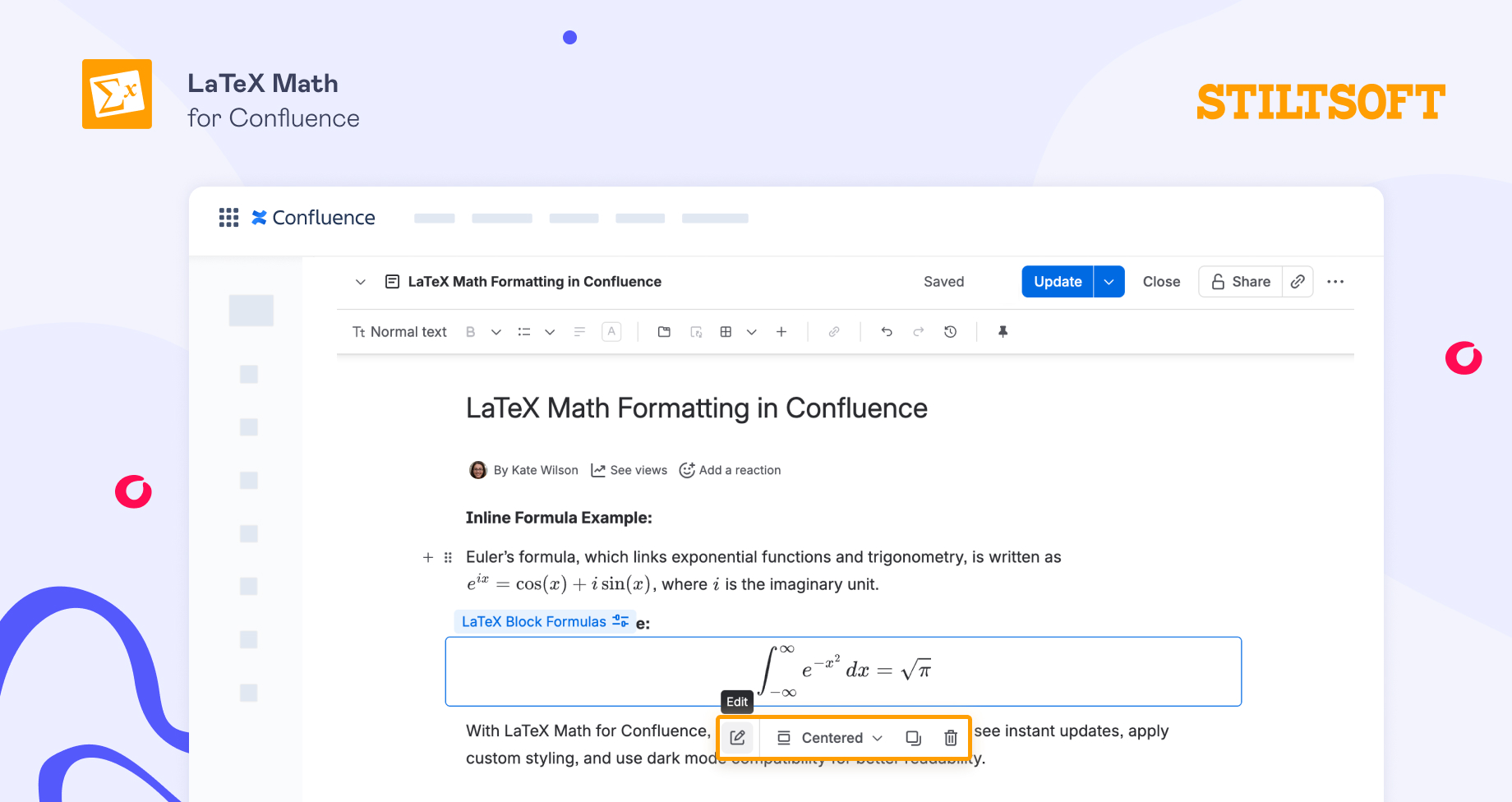
The LaTeX Block Formulas macro adds math equations as a separate block on their own line. This option is excellent for complex formulas, like matrices or multi-step calculations. Here’s an example of the Confluence page with block formulas:

To add this macro, follow the same steps described for the LaTeX inline macro, but select LaTeX Block Formulas. Block formulas are centered by default. You can align them left or right from the macro menu.
Once you have selected a macro, you can type a formula using LaTeX syntax and see a live preview of how it will look on your Confluence page.
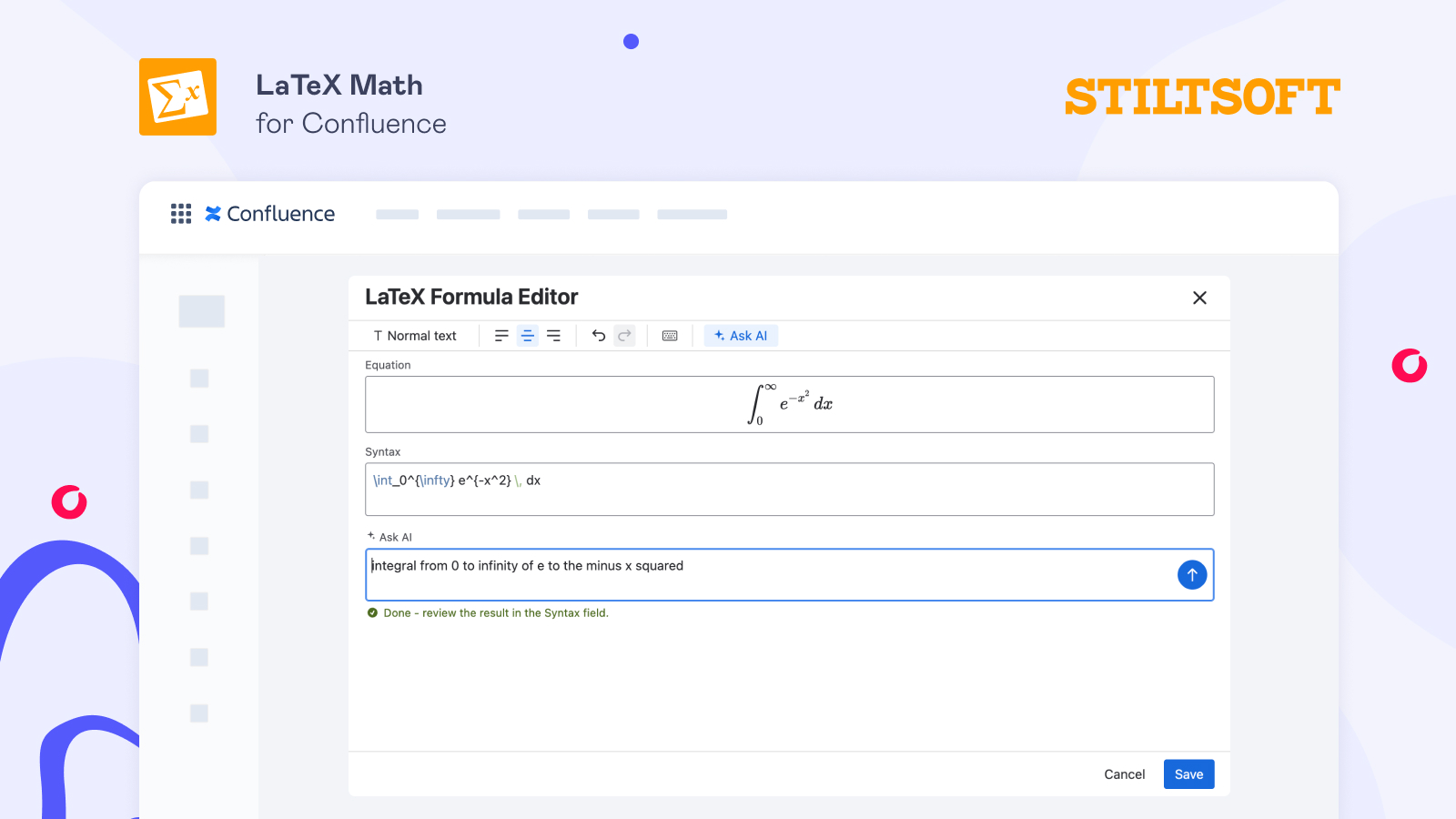
When your first formula is on the page, the next step is the syntax itself. Our guide to writing math equations in Confluence covers fractions, sums, matrices, and more.
 Tip: If you don’t remember the syntax, use the built-in symbols keyboard or search for a command by name, for example, “square root”. You can also click Ask AI and describe the formula in plain words. It writes the LaTeX for you.
Step 3: LaTeX formatting in Confluence: size, color, and background
LaTeX Math for Confluence lets you format each formula to fit your page. You can change the color of formulas, add a background, or highlight parts of the equation to keep your documentation clear and well-structured, no matter how complex the formulas are.
You can also set the size of a formula with the Text styles menu in the formula editor. Pick normal text, small text, or a heading level, and the formula is rendered at that size. This helps when an inline formula sits in a heading or in small text. The size is kept in PDF exports.
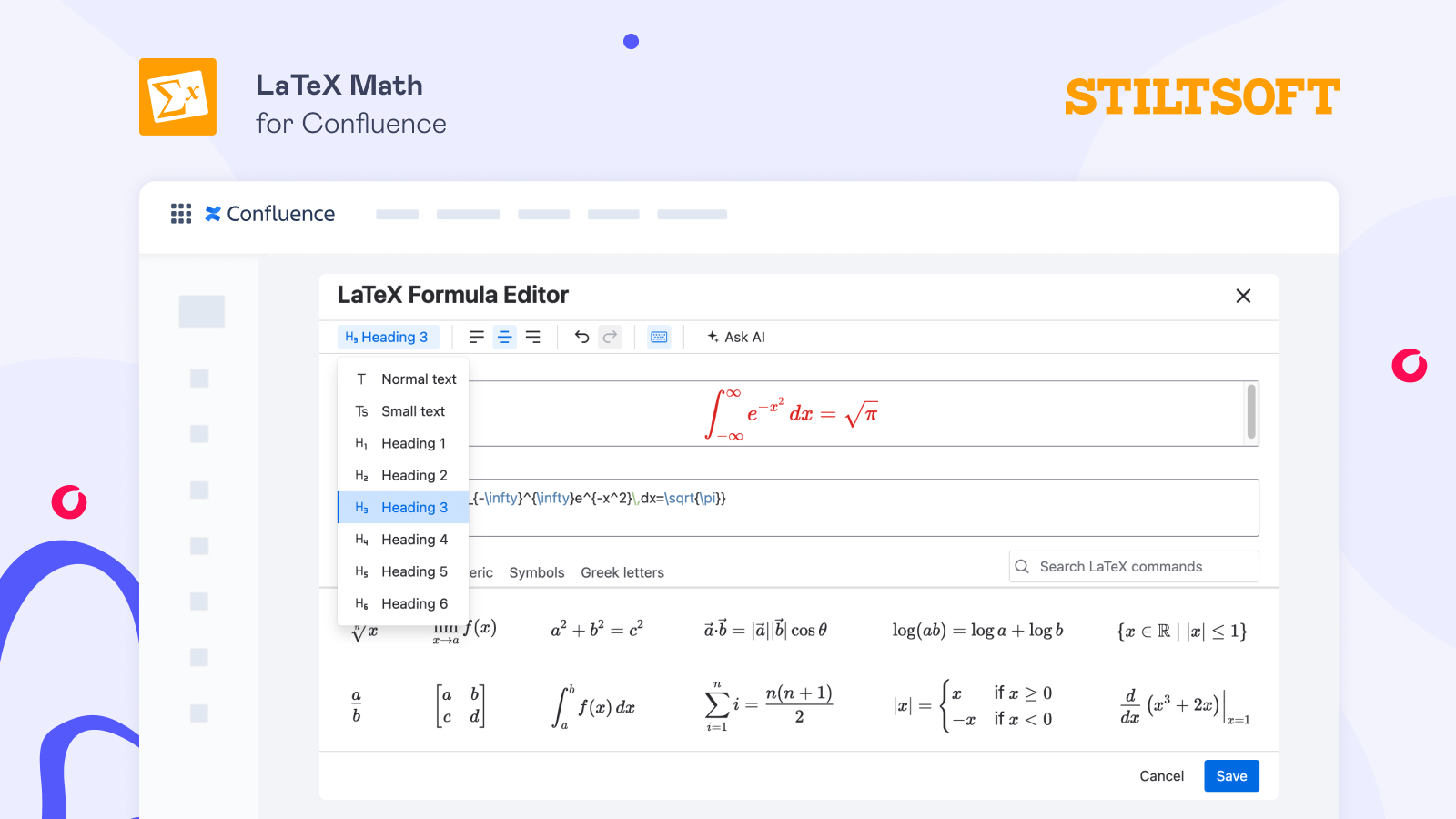
For more details, visit our documentation on how to add custom formatting to your formulas.
How to edit a Confluence LaTeX macro
To change a formula, click it on the Confluence page in edit mode and then click the edit icon. The editor opens with your LaTeX syntax and the live preview. Make your changes and click Save.
Why choose LaTeX Math for Confluence?
- Accuracy: Render equations exactly as you type them using LaTeX syntax without worrying about low-quality images or broken formatting.
- Formatting: Adjust your formulas’ size, color, and background to fit the style of your documentation.
- Input help: Use the symbols keyboard, command search, or the built-in AI assistant when you don’t remember the syntax.
- Collaboration: Share math formulas that your team can easily understand or update.
- Security: The app is built on Atlassian Forge and runs inside Atlassian Cloud, so your formulas stay there. Here is how to choose a secure LaTeX app for Confluence.
👉 Try LaTeX Math for Confluence free for 30 days, and add your first LaTeX formula in Confluence in about a minute.
LaTeX in Confluence: FAQ
Does Confluence support LaTeX? Not on its own. Confluence Cloud has no built-in math engine such as MathJax, so a LaTeX formula typed onto a page stays plain text. To use LaTeX in Confluence, install an app such as LaTeX Math for Confluence by Stiltsoft.
Is there a Confluence LaTeX plugin? Yes. LaTeX Math for Confluence by Stiltsoft is a secure LaTeX plugin for Confluence Cloud, available on the Atlassian Marketplace. It renders LaTeX and AsciiMath formulas on Confluence pages.
What is the Confluence LaTeX macro? It is the element on a Confluence page that holds a formula. You type LaTeX syntax into the macro, and the page shows the rendered formula. LaTeX Math for Confluence by Stiltsoft has two LaTeX macros: LaTeX Inline Formulas and LaTeX Block Formulas, and two AsciiMath macros. You insert them with /latex or /ascii.
How do I add LaTeX to Confluence? After installing the LaTeX Math for Confluence app, type /latex on the page and choose LaTeX Inline Formulas or LaTeX Block Formulas. Type the formula in LaTeX, check the live preview, and click Save.
What is the difference between inline and block LaTeX macros? An inline formula macro sits inside a sentence, at the size of the text around it. A block formula stands on its own line and suits longer equations, matrices, and multi-step calculations.
Can I export LaTeX formulas from Confluence to PDF? Yes. Using LaTeX Math for Confluence by Stiltsoft, you can export formulas with Confluence’s built-in PDF exporter and with the Scroll PDF Exporter app. For more details, see our guide on how to export LaTeX to PDF in Confluence without broken formulas.
Can I add a LaTeX macro to a Confluence table? Yes. Click inside a table cell, type /latex, and add the formula as usual. The formula stays inside the cell with the rest of the table content. See examples in our post about LaTeX formulas in Confluence tables.