






How to Add Formulas to Confluence Without Knowing LaTeX

There’s a quiet assumption behind most advice on adding formulas in Confluence: that you already know LaTeX. Type \sum_{i=0}^{n} and a clean summation appears. But what if you don’t know the syntax or knew it once and can’t remember how to write a piecewise function anymore? You still need the formula on the page, and “go learn LaTeX language first” isn’t a real answer when you’re mid-document.
The good news is that you don’t have to. With the right app, you can describe a formula in plain words and have it rendered as a real, editable equation on the page. This article shows how to add formulas to Confluence for people who know LaTeX and those who don’t.
Key takeaways
- Confluence has no native support for LaTeX, so adding properly rendered math formulas requires an app from the Atlassian Marketplace, such as LaTeX Math for Confluence.
- You don’t need to know LaTeX syntax. The app’s Ask AI feature lets you describe the formula in plain words, and it writes the LaTeX syntax for you.
- The result is an editable equation, not a screenshot, so you can tweak it later, and it exports cleanly to PDF.
- It works both ways: describe formulas in plain words if you don’t know LaTeX, or type the syntax directly if you do.
The barrier: you need a formula, but not everyone writes LaTeX
Two very different people hit the same wall in Confluence.
The first is the engineer who knows LaTeX well. They write fractions and sums without thinking, but every so often they need something they reach for rarely — a quantum expectation value in bra–ket notation, a deeply nested continued fraction, a tensor with indices stacked above and below. The syntax is searchable, but stopping to look it up breaks the flow of writing.
The second is everyone else: the analyst documenting a model, the product manager writing a spec, the new teammate who studied something other than LaTeX. They know exactly what the formula should look like. They just don’t write LaTeX, and they’re not going to learn its syntax to add one equation to a page.
The usual fallback for both is a screenshot of the formula from somewhere else. It looks fine until the moment it doesn’t: it can’t be edited when an assumption changes, it blurs at different zoom levels, and it exports badly to PDF. What both people actually want is the same thing — a properly rendered equation that stays editable, without the syntax standing in the way.
Why Confluence needs an app for formulas
Out of the box, Confluence doesn’t understand LaTeX and needs an app for formulas. Type \sqrt{x} on a page and you get the literal characters, not a square root. There’s no built-in math renderer at all.
To close that gap, you install an app from the Atlassian Marketplace that adds LaTeX rendering to Confluence. LaTeX Math for Confluence is one of them. It adds two macros: one for inline formulas inside a sentence, one for block formulas on their own line. The detail that matters for this article is how you enter it: you don’t have to write the LaTeX yourself.

Describe it in plain words and let AI write the LaTeX
Inside the formula editor, alongside the manual input field, LaTeX Math for Confluence offers an Ask AI option. Instead of typing LaTeX commands, you describe the formula the way you’d say it out loud — “square root of x, plus the sum from i equals zero to five of x, minus the quantity a x squared plus b x plus c, plus log of x” — and the AI writes the corresponding LaTeX into the Syntax field. The equation renders live in the preview above it, so you see the real formula take shape as the syntax is filled in.
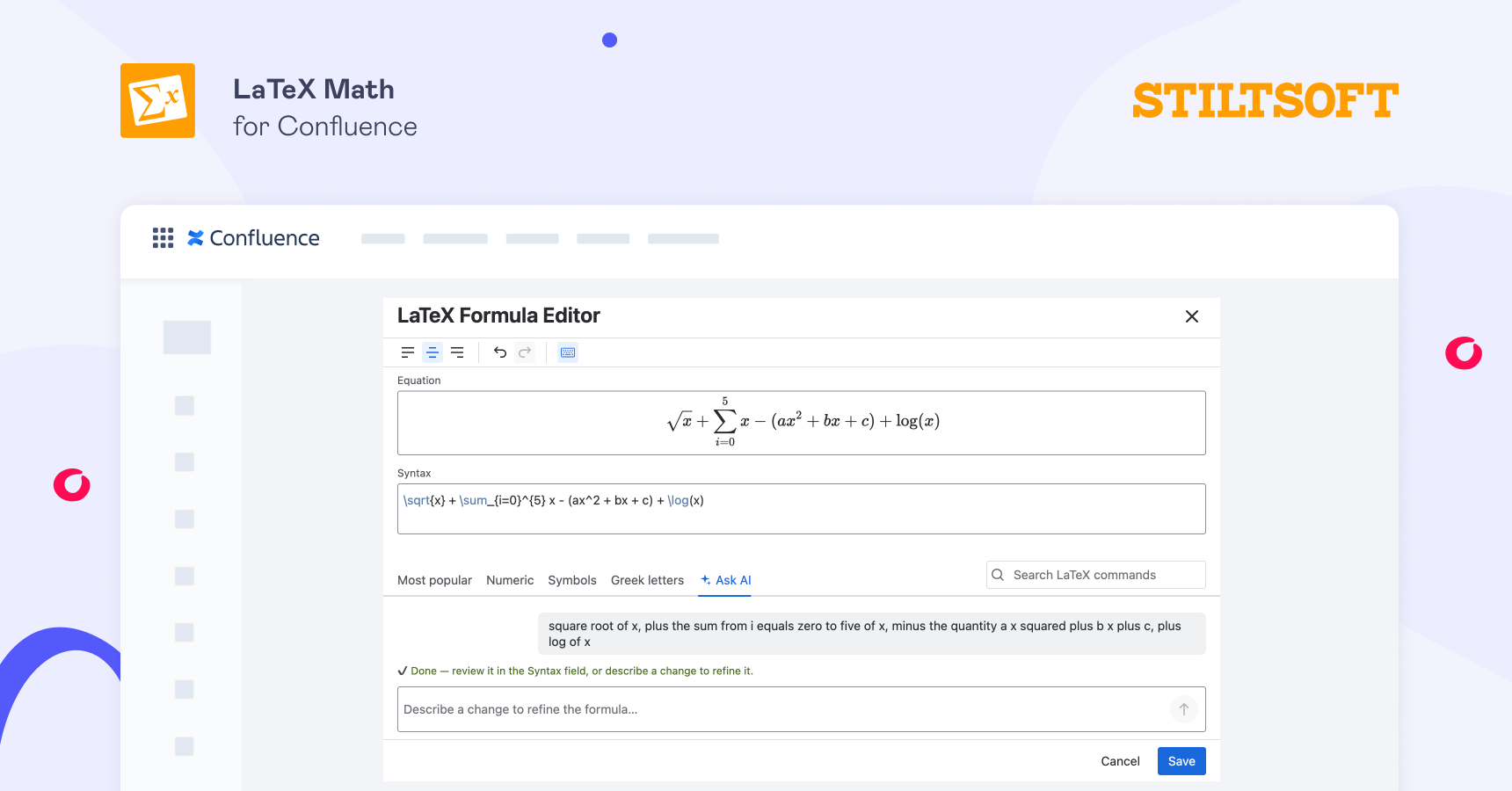
This is the part that removes the barrier. You describe your formula in plain text, and the syntax is generated for you. And because it lands in the editable Syntax field rather than as a flat image, the output is a formula you can adjust, restyle, and export like any other.
For the engineer who knows LaTeX, this is a shortcut for constructs they rarely use. For everyone else, it’s the difference between adding the formula to Confluence and giving up and pasting a screenshot.
Step-by-step: from plain text to a rendered formula in Confluence
- Install LaTeX Math for Confluence from the Atlassian Marketplace.
- Open the page, switch to edit mode, type
/latex, and choose LaTeX Block Formulas (for a standalone equation) or LaTeX Inline Formulas (for a symbol inside a sentence). - In the editor, open the Ask AI tab.
- Describe your formula in plain words.

- The AI writes the LaTeX into the Syntax field, and the equation renders in the live preview.
- Check the preview. If anything’s off, refine your description or edit the syntax directly — then click Save.
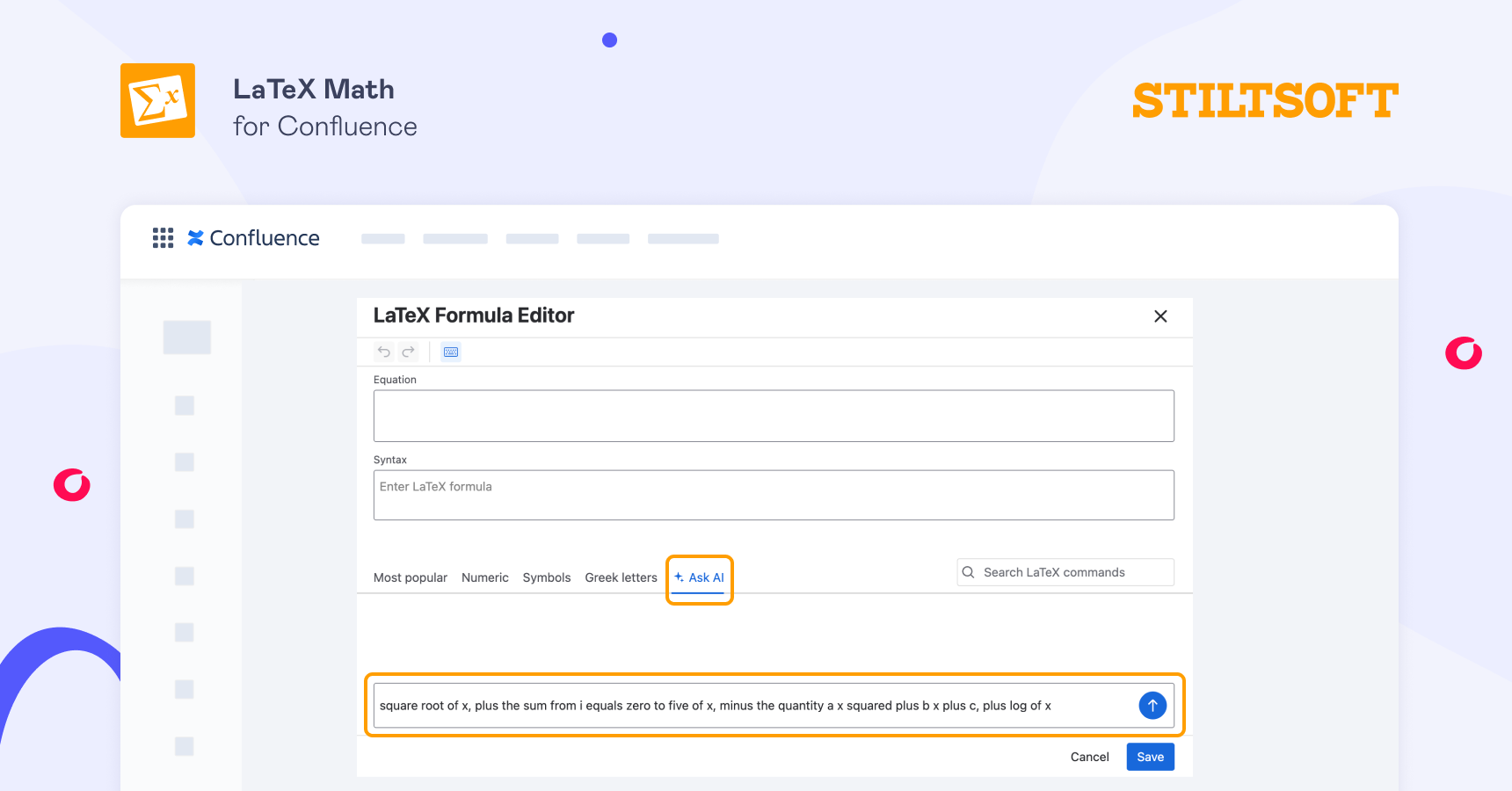
The formula now appears on the page as proper notation, fully editable whenever you need to change it.
You don’t lose the LaTeX way to insert formulas in Confluence
Ask AI is an addition, not a replacement. If you already know LaTeX or want precise control over a complex expression, you can type the syntax directly into the same editor, exactly as before. The app also includes a symbol keyboard and a command search, so you can find a symbol without having to remember its exact command. Our guides on writing math equations in Confluence, as well as on sums, integrals, and math functions, cover the syntax in depth.
The point is that the door is open from both sides: plain words to add formulas to Confluence if you don’t know LaTeX, raw syntax if you do.
Formulas export cleanly too
Because the AI produces a real formula and not an image, everything works the way it should. The equation renders consistently on the page, stays editable, and exports to PDF as proper notation through Confluence’s built-in PDF export and the Scroll Exporter apps — no broken images or “formula rendering error.”
Getting started
If your team needs math on Confluence pages but not everyone writes LaTeX, LaTeX Math for Confluence is free to try on the Atlassian Marketplace. Install it, open a page, describe your first formula, and watch it render — your first equation will take about a minute or even less with AI.
FAQ
Do I need to know LaTeX to add formulas to Confluence?
No. With LaTeX Math for Confluence, you can describe a formula in plain text using the Ask AI feature, and the app writes the LaTeX syntax for you. You can still type LaTeX manually if you know it.
Can AI write LaTeX formulas for me in Confluence?
Yes. The Ask AI feature of the LaTeX Math for Confluence app takes a plain-language description of your formula and generates the corresponding LaTeX in the editor’s Syntax field, rendering the equation in a live preview.
Is the AI-generated formula editable, and does it export to PDF?
Yes to both. The output is a real, editable equation rather than a screenshot, so you can change it at any time. It exports to PDF as proper notation through Confluence’s built-in export and the Scroll Exporter apps.
Does Confluence support math formulas natively?
No. Confluence has no built-in LaTeX or math rendering — typing LaTeX gives you the raw characters. Rendering math requires an app from the Atlassian Marketplace, such as LaTeX Math for Confluence.