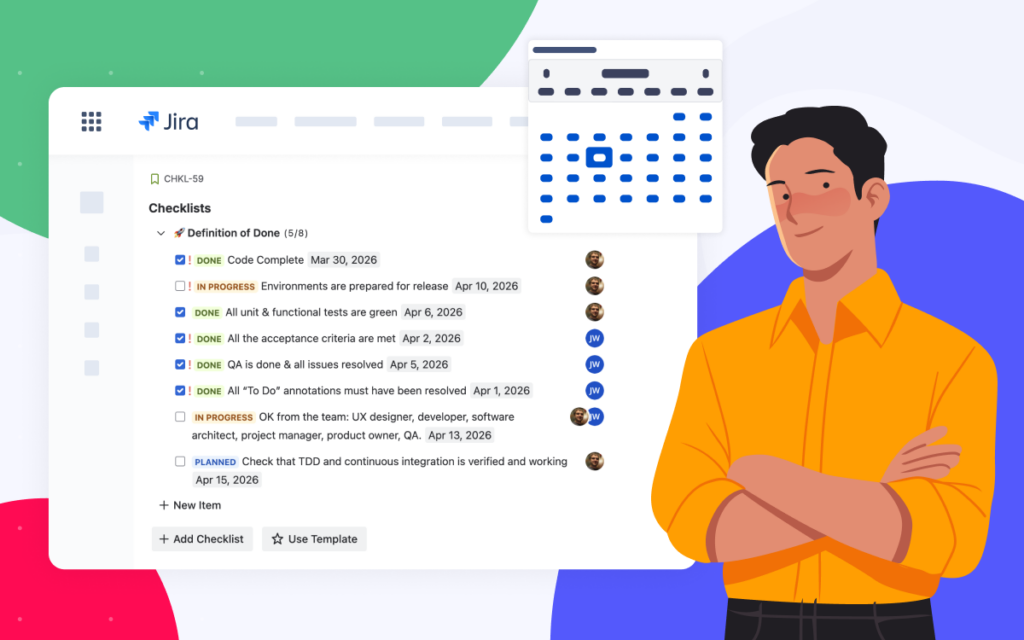







AI Checklists for Jira: Auto-Generate Acceptance Criteria, DoD & DoR from Confluence

If your team writes requirements in Confluence and tracks the work in Jira, you already know the gap between the two: someone has to copy the Acceptance Criteria, Definition of Done, or Definition of Ready from the page into the ticket by hand, every single time.
This article looks at how AI Checklists for Jira can close that gap for you: reading a Confluence page, turning the criteria into a checklist inside the Jira work item, and keeping it up to date as things change.
Key Takeaways
- Copying Acceptance Criteria, DoD, and DoR into every Jira ticket manually takes time, and it’s easy to make mistakes along the way. Most of that text already lives in Confluence, but it isn’t connected to your Jira yet.
- AI in Checklists for Jira (Templates & Automation) can read your Confluence page and turn it into a checklist right inside the Jira work item.
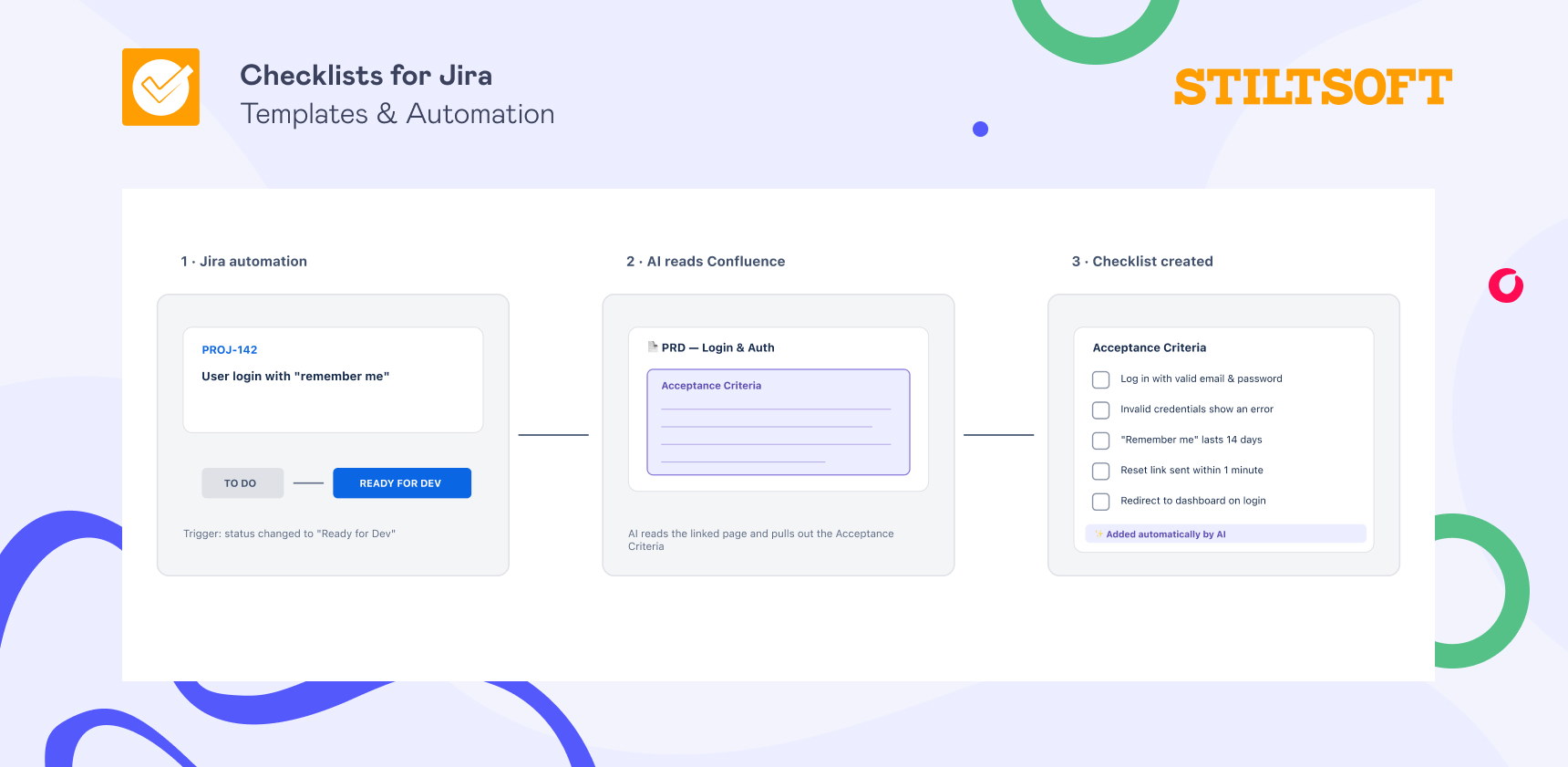
- The main idea is simple: a ticket gets created, AI pulls the criteria from the PRD on the Confluence page, and the checklist appears in Jira.
- When someone updates the Confluence page later, AI notices and lets you know which checklist items no longer match, so your ticket never drifts away from the PRD.
- AI can also check a checklist you already have and point out anything that’s missing before the work moves forward.
The tedious part: copying criteria from Confluence into every Jira ticket
If you run sprints, this workflow will sound familiar. A new story comes in, someone opens the Confluence page where the Acceptance Criteria and Definition of Done are kept, copies the relevant part, pastes it into the ticket, and tidies it up so it actually looks like a checklist.
When you do that for every story, in every sprint, across every team, the minutes quickly turn into hours, and small things start to slip. One person copies the whole Definition of Done, someone else grabs a version that’s a little out of date, and a third just types it from memory. After a few sprints, “done” quietly means something slightly different on every ticket, which is exactly the problem the Definition of Done was meant to solve in the first place.
The information itself is rarely the issue — most teams already have well-written criteria in Confluence. The issue is the repetitive little step of moving that information from Confluence to Jira.
What we mean by “AI Checklists for Jira”
In Checklists for Jira (Templates & Automation), AI comes down to three things that all work the same way: AI reads your text and does the tedious part for you.
First, it reads a Confluence page (a PRD, say), finds the Acceptance Criteria or Definition of Done, and turns them into a proper checklist in your Jira story, so you don’t have to read through it, pick out the important bits, copy them, and reformat everything yourself. Second, when that Confluence page changes later, it notices and keeps your checklist in sync. And third, it can look over a checklist you already have and point out anything that’s missing.
What you get back in each case is an ordinary checklist that you can tick off, assign to teammates, and track like any other.
How AI Checklists for Jira works
Part 1: AI builds the checklist from your Confluence page
Let’s say your team keeps the PRD for a new feature in Confluence. Right now, getting that content into a ticket is a manual job. Here’s how AI in Checklists for Jira is meant to take it off your hands, with the help of Jira automation:
- You set a trigger: a ticket gets created, moves to the “Ready for Dev” status, or picks up a certain label, whatever it is on your team that means “this one needs its criteria now.”
- AI finds the right Confluence page for that ticket (from a link in the Jira ticket description, for example), reads the page, and pulls out the chosen criteria, whether that’s Acceptance Criteria, the Definition of Done, or the Definition of Ready. Then, it turns them into separate checklist items.
- The checklist appears in the Jira ticket, ready for you to tick off, assign, and track.
The result is that whoever opens the ticket sees the current criteria, in the same format every time, and nobody has to copy a single line.
Part 2: AI keeps the checklist up to date when requirements change
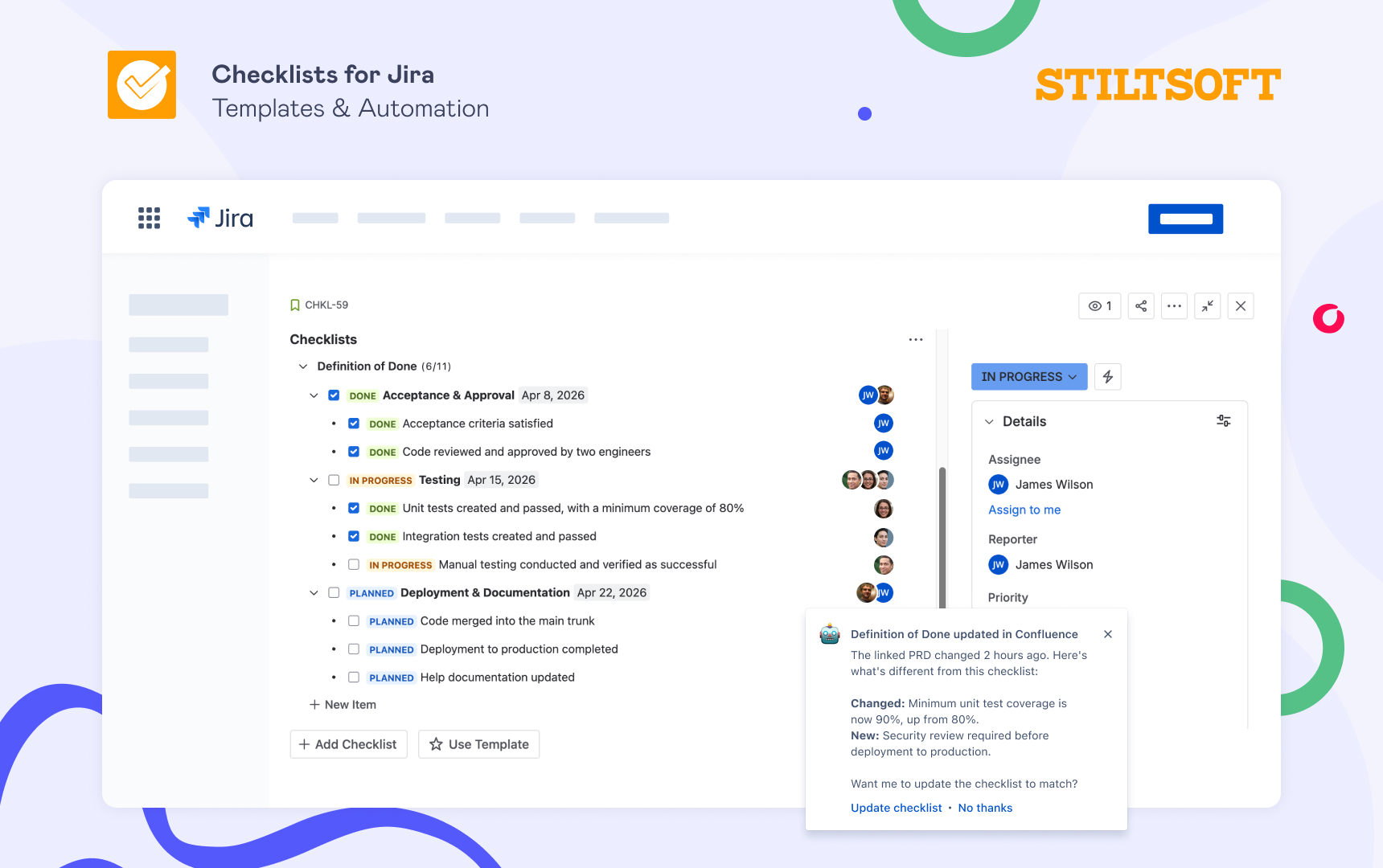
Requirements change over time. Someone edits the Confluence page, adds a new acceptance criterion, or tweaks a rule. Usually, nobody thinks to go back and update the Jira story, so the checklist you copied last week is now out of date — and more often than not, you only find out when something ships that shouldn’t have.
With AI, this plays out differently. When the Confluence page changes, AI in Checklists for Jira notices and compares the updated page against the checklist that’s already sitting in your ticket. Then it tells you what’s changed and offers to update the checklist for you. So instead of hoping everyone caught the edit, you get a gentle heads-up that says: “The acceptance criteria changed, and here’s what’s different in this ticket.”
Part 3: AI analyzes the gaps between the PRD and your Jira tickets
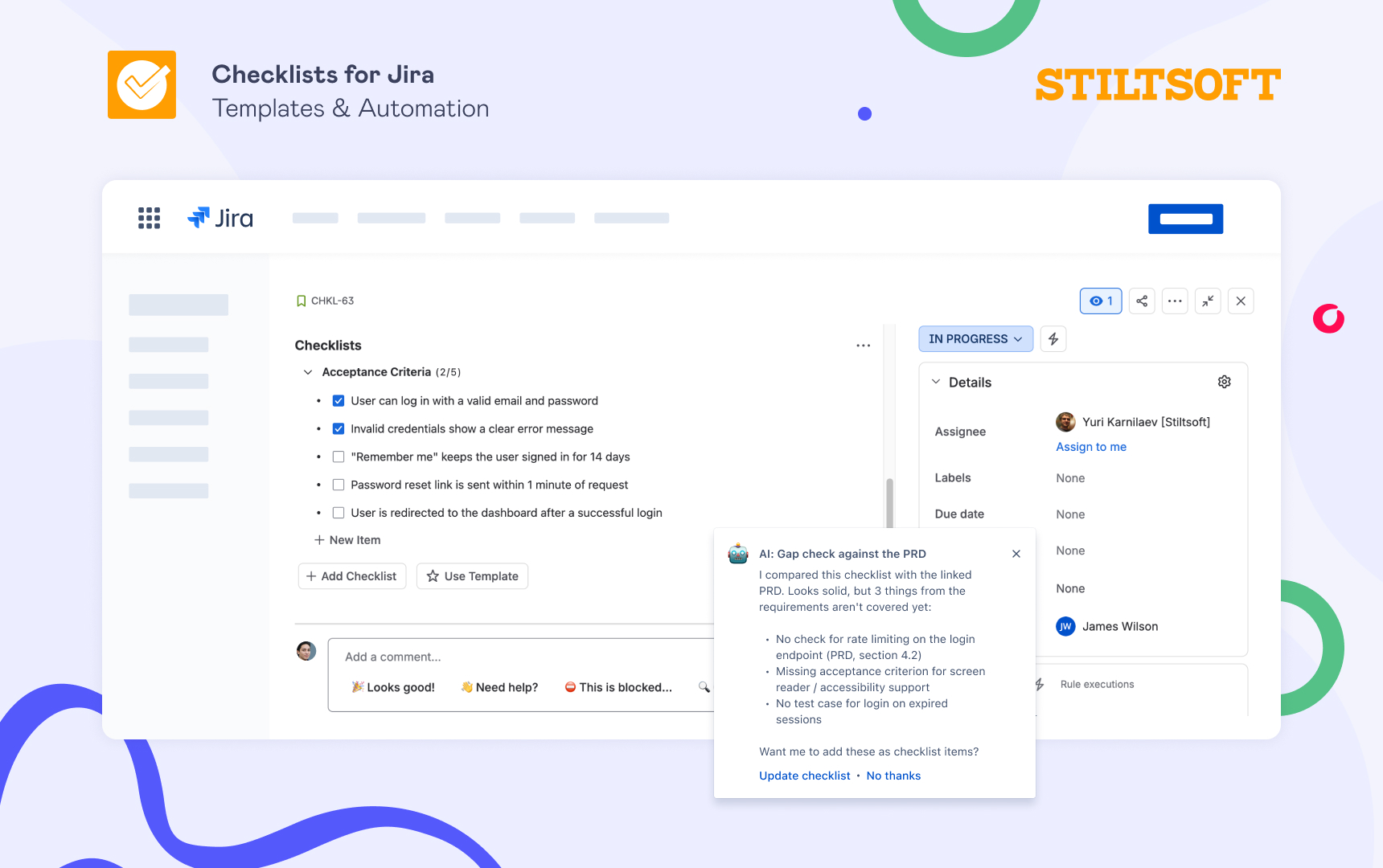
It works the other way around, too. Say you have a Jira task that already has dev and QA checklists, and you want to be sure nothing’s been missed before it moves forward. AI can look at the requirements and the existing checklist side by side and point out the gaps: a missing test case, a step nobody wrote down, a criterion that isn’t covered anywhere. You stay in charge of what actually gets added — AI simply catches the things that are easy to overlook when everyone’s moving fast.
A few tips to get the most out of it
- Keep your Confluence pages tidy. AI does a better job when a page has a clearly labeled “Acceptance Criteria” or “Definition of Done” section, rather than one long wall of text.
- Treat the AI’s output as a strong first draft. It’s worth having someone glance at the generated checklist before things move ahead, since the main goal is to save you from copy-pasting.
- Start with one workflow. Pick your busiest Jira task type, get it working nicely there, and then expand. There’s no need to switch it on everywhere at once.
Want to try it first?
AI checklists for Jira are about taking the tedious parts out of your work. They build a checklist from your Confluence page so you don’t have to copy criteria into every ticket manually, they keep that checklist in sync when the requirements change, and they help you spot anything that’s missing before the work moves forward.
We’re building them on Atlassian’s own AI capabilities for apps, which Atlassian is still rolling out to vendors. So the timeline partly depends on them, not just on us. We’re opening early access first so we can test the feature with real teams and their real Confluence pages before a wider release. If you’d like to be one of the first to try it, just send our support team a message, and we’ll add you to the early-access list. In the meantime, you can try Checklists for Jira (Templates & Automation) free for 30 days and start tidying up your Jira tickets today.
Related reading:
- Acceptance Criteria in Jira: Tutorial for Agile Teams
- How to Track the Definition of Done in Jira with Checklists
- How to Automatically Add Checklists to Jira Tasks
FAQ
What are AI checklists for Jira?
AI checklists are a feature of the Checklists for Jira (Templates & Automation) app that reads text from a Confluence page and turns it into checklist items in your Jira work item. Instead of copying the Acceptance Criteria, Definition of Done, or Definition of Ready and reformatting it yourself, you let AI handle that part. The result is an ordinary checklist you can tick off, assign, and track like any other.
When will AI checklists be available?
We’re building them on Atlassian’s own AI capabilities for apps, which Atlassian is still rolling out to vendors. So the timeline partly depends on them, not just on us. We’re opening early access first so we can test the feature with real teams and their real Confluence pages before a wider release. Message our support team if you’d like to be on that list.
Can AI pull Acceptance Criteria from Confluence into Jira automatically?
Yes, that’s the core idea. Using Jira automation, a trigger such as a new ticket or a status change tells the app to read the linked Confluence page, find the Acceptance Criteria, and add them to the Jira work item as a checklist. This feature is currently in development, so message our support team if you’d like to join the early-access list.
Does it work with the Definition of Ready and Definition of Done too?
Yes. The AI doesn’t mind what the content is called. If your Confluence page documents a Definition of Ready, a Definition of Done, or Acceptance Criteria, you can point AI at whichever one you need, and it will turn that section into a checklist in the ticket.
What happens when the Confluence page changes later?
When someone edits the Confluence page, AI in Checklists for Jira compares the updated version against the checklist already in your ticket and flags what no longer matches. It then offers to update the checklist for you, so your Jira work item doesn’t quietly fall out of sync with the requirements.
Will AI checklists replace our Confluence documentation?
No. Confluence stays your source of truth, and the feature depends on it. AI simply connects your Confluence pages to your Jira tickets, so the criteria you’ve already written show up where the work actually happens.
Is my Confluence and Jira data safe?
Yes. The AI works inside Atlassian’s environment, so your Confluence and Jira data stays on the platform and isn’t sent off to an outside service. For teams where security and compliance matter, this keeps your requirements within the tools you already trust.
How is this different from using a checklist template?
A template is best for fixed content that’s the same on every ticket. AI is for content that lives in Confluence and changes over time, or that differs from one ticket to the next — it reads the current page each time, instead of relying on a static copy you have to keep updating by hand.